
What are Facebook Unpublished (Dark) Posts?
A Facebook dark post describes a targeted ad that doesn't appear on the advertiser's timeline or in the feeds of the advertiser's followers. Dark posts are different from posts that are boosted and published organically.
Dark posts instead appear on the feeds of audiences that are being targeted and are labeled as sponsored content.
This feature is available for Enterprise users.
How to create a Facebook Dark (Unpublished) Post
1. Select the Facebook profile you want to create Ads, from the list of Pages.

2. A list of ad accounts will be shown in the Ad Account drop-down list after selecting the Facebook page.
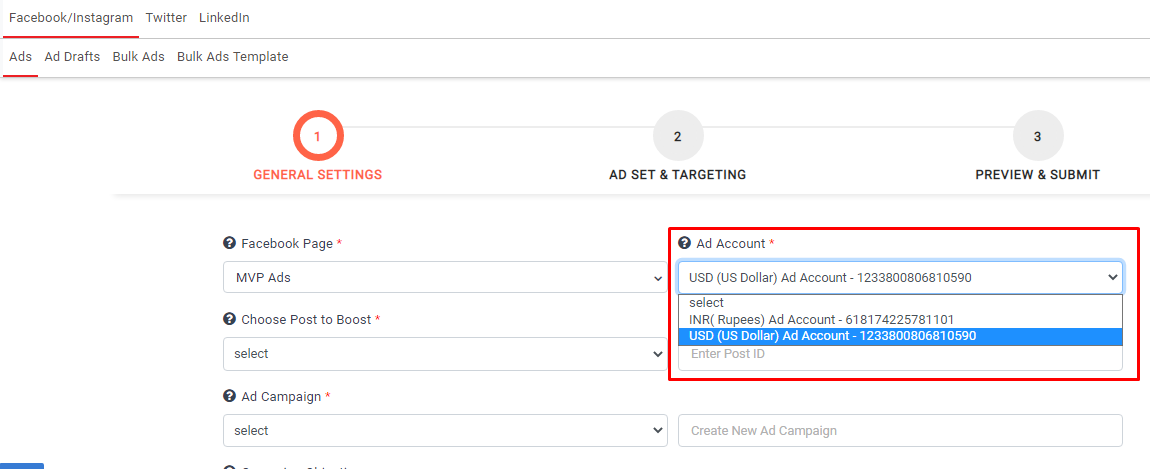
3. Select the Ad Account which you want to use to create ads.
4. Select Create an Unpublished (Dark) Ad from Choose Type of Ad from the drop-down.

5. Select the campaign from the Ad campaigns drop-down list if you want to create an Ad under an existing campaign.

6. If you want to create a new campaign, type in its name

7. Select the campaign objective; objectives are the first component of campaign strategy; they describe an effort’s intended result or outcome. Currently, we are supporting two types of objectives.
Reach: Show your ad to as many people as possible in your target audience.
Conversions: Encourage people to take a specific action on your business site, such as having them add items to a cart, download your app, register on your site, or make a purchase.

8. If you wish to run an ad for credit, employment or housing, toggle the Special Ad Category check the relevant check box.

9. You can choose to switch on Campaign Budget Optimization.

10 You need to select the budget type, amount, and bid strategy under the Campaign Budget Optimization.

11. Click on the continue button, and the campaign will be created.

12. Now, you need to create the Ad set name and location

13. You can give the radius in miles or kilometers

14. Targeting options include age, gender, interests, and languages.

15. Here you can select an existing custom audience.

16. Select the audience from the list of existing audiences.

17. Click on the continue button after completing your targeting options.

18. The Ad set will be created.

19. Here you need to provide the Ad name.

20. Upload or select a single image/video from the digital library

21. Give the dynamic fields data including primary text, news feed link description, website URL, and call to action button

22. You can select the required call to action buttons from the drop-down list.
23. After completing these fields, click continue.

24. The dark post ad will be created and scheduled on Facebook.
Note:
- If you select the conversion objective in the first step, the Pixel and Pixel Events options will be enabled in the second step.
- URL needs to be provided in the post description when you run the Ad with a Conversion objective.
- The allowed radius ( in km ) is 17 to 80 km
- The allowed radius ( in miles ) is 10 to 50 mi
- If you want a news feed description, then a website URL must be specified
- Dynamic creative ad sets allow for one active ad. Users cannot create more than one ad under the same dynamic creative ad set
- Book now call to action button is available when you select Reach objective
Comments
0 comments
Please sign in to leave a comment.