
WeChat Direct Messages are from followers of an Official Account and can be replied to within 48 hrs of when they are received via the Social Inbox.
WeChat Direct Messages are available for Business and Enterprise subscriptions.
To receive WeChat Direct Messages, you need to configure the MavSocial URL in WeChat Official Account admin tool.
Step by Step Instructions
- Login to your Official Account
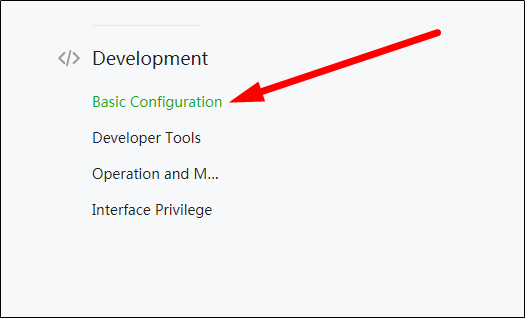
- Click on ‘Basic Configuration’ option under ‘Development’ section
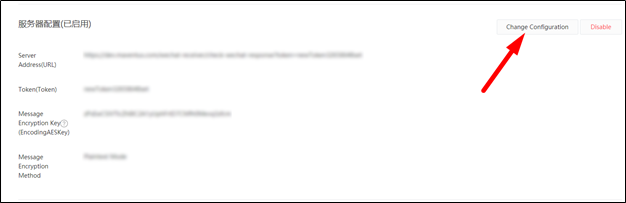
3. In Server Configuration block, Click on “Change Configuration” button
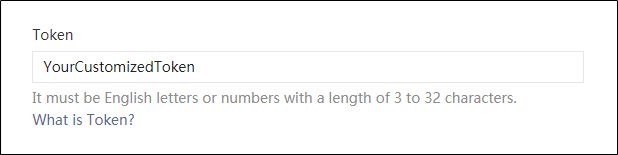
 4 4. In Token input field, create your own customized token
5. In the URL input field, enter MavSocial URL, followed by your customized token
Example: https://app.maventus.com/wechat-receiver/check-wechat-response?token=[YourCustomized Token]

6. Click on Submit
MavSocial is configured successfully for your WeChat Official Account
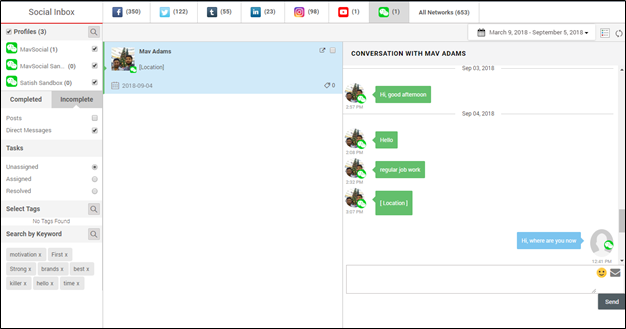
7. Navigate to Social Inbox and click on the WeChat icon
8. Select Direct Messages option
9. You can reply to messages from the input field on the bottom right side.
Comments
0 comments
Please sign in to leave a comment.